A home inventory becomes more useful when the right person can see the right record at the right time. You might need to show a family member where important belongings are, send a moving helper a list of fragile items, or discuss documented belongings with an insurance contact after theft, fire, water damage, or another stressful event.
CasaKeep helps you build that record before the moment is urgent. Each item can have a room or location, one or more collections, both, or neither. You can attach photos and receipts, save notes and serial numbers, and use live sharing, snapshot sharing, or export workflows when someone else needs context.
Sharing does not mean sending your whole household record to everyone. The strongest approach is selective: share only the slice that fits the situation.
What to share and what to keep private
Start by deciding what the other person actually needs. A family member may need a priority-items list, document locations, or a room overview. A mover may need fragile items, high-value furniture, destination rooms, or box notes. An insurance contact may need item names, photos, receipts, serial numbers, values, and condition notes.
Keep sensitive details limited to the use case. You do not need to share every belonging, every location, or every note just because the inventory exists. Use location labels or collections only to separate the useful subset from the full household record.
For most sharing situations, the best fields are item name, photo, room, category, condition, value when known, receipt or warranty note, serial number for electronics, and a short description.
Sharing with family for emergency or household handoff
Family sharing is useful when more than one person may need to understand the home. That could mean emergency prep, elder care, estate planning, college move-out, divorce property handoff, or simply helping someone find important belongings.
Create a collection for the purpose if a list would help. Examples include Priority items, Important documents, Family keepsakes, Storage unit, Emergency grab list, or Shared household items. Add the items that matter for that situation, then keep the collection updated as things move or change.
This is especially helpful when one person usually manages the home record. A shared inventory can turn private memory into a practical household reference.
Sharing inventory documentation for insurance conversations
Insurance documentation is easier when your record already has photos, receipts, values, serial numbers, warranties, and room context. If you ever need to discuss belongings with an agent, adjuster, or support contact, a prepared inventory gives you a clearer starting point than memory alone.
CasaKeep does not promise claim approval or replace advice from your insurer. It helps you organize household documentation so the details are easier to review, update, and share when documentation matters.
For insurance-related sharing, prioritize the belongings that would be hardest to recreate from memory: electronics, appliances, furniture, tools, bikes, jewelry, watches, cameras, musical instruments, art, collectibles, and work equipment.
Sharing with movers, helpers, and roommates
Moving is one of the best reasons to share a focused inventory. Helpers do not need your whole home record. They need the practical details: what is fragile, what is valuable, what goes first, what goes to storage, what belongs to which room, and what should not be packed by accident.
Create collections like Fragile, First night box, Storage unit, Sell or donate, Office setup, or Do not pack. Use photos before items are wrapped or boxed. Add notes for condition, destination room, box number, and special handling.
If belongings are split between roommates, family members, or destinations, collections can make those handoffs clearer and less dependent on last-minute memory.
How CasaKeep supports sharing
CasaKeep starts with item records. Rooms are optional location labels. Collections are optional lists for a purpose. Item details keep photos, notes, values, receipts, warranties, and serial numbers attached to the thing they belong to.
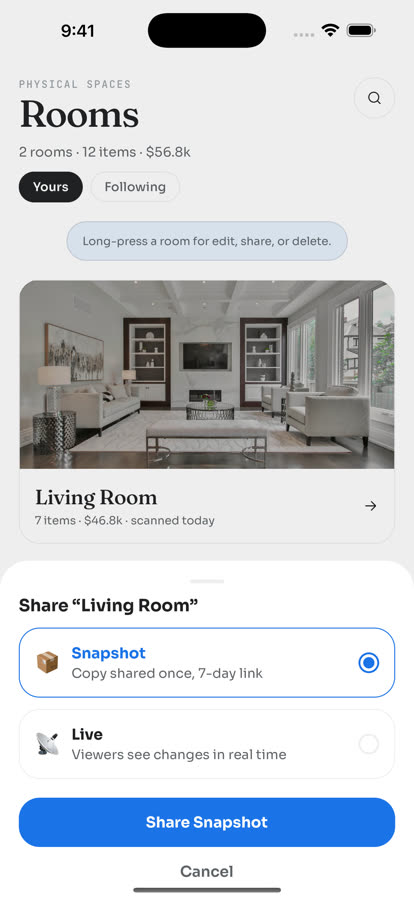
When it is time to involve someone else, CasaKeep supports sharing workflows for items, rooms, and collections. The best option depends on whether the other person needs a changing list, a point-in-time view, or a portable record.
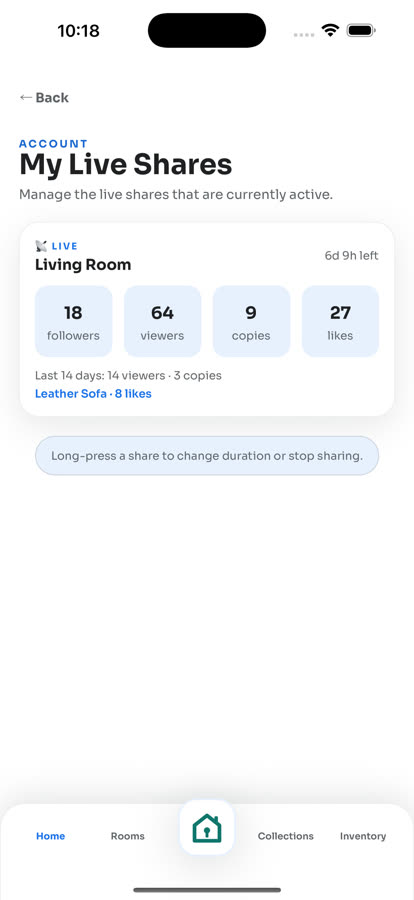
Live share
Use live share when the list may keep changing. This is useful during a move, estate cleanout, family handoff, storage run, renovation, or emergency prep where someone else may need the updated version for a limited time.
For example, a Storage unit collection may change as boxes move in and out. A Fragile collection may change while packing. A Family keepsakes collection may change as relatives make decisions. Live share helps the viewer follow the current list without sending a new message after every update.
Snapshot share
Use snapshot sharing when you want to send selected item details as they exist at that moment. A snapshot does not receive later changes. It can help with a simple handoff or a focused set of records.
Snapshots work well for before-and-after move documentation, roommate handoffs, a list of items going to storage, a set of belongings to sell or donate, or a focused record to discuss with someone helping you organize.
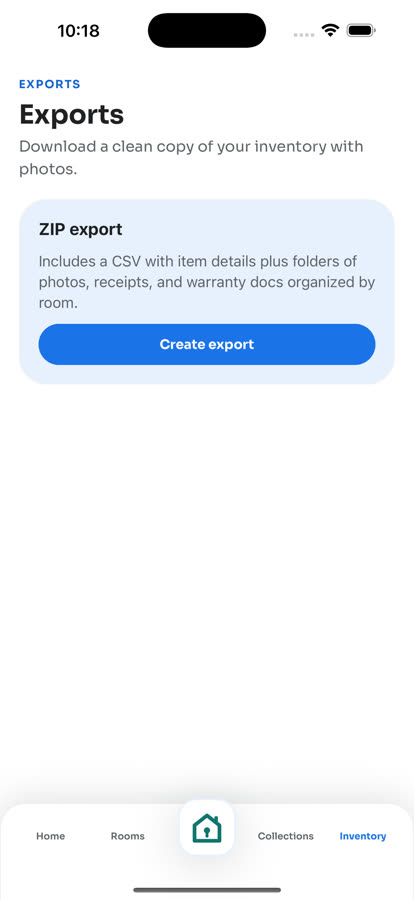
Export
Use export when you want structured data and pictures for your own files or a more formal handoff. CasaKeep can export CSV data, and the full ZIP export includes inventory.csv plus image folders for item photos, receipt photos, and warranty-doc photos. Export can help when you want to keep a copy outside the app, prepare records before a move, organize documentation for an insurance conversation, or share a structured inventory with someone who does not need ongoing access.
Export is not a promise that a third party will accept every detail or that the record replaces professional guidance. It is a practical way to keep item names, photos, notes, receipts, values, warranties, and serial numbers together when you need a clearer record.
Manual entry stays at the center. Optional scan help can speed up the first pass, but you should still review the details yourself before sharing them.
A simple sharing workflow
Pick the situation first: family handoff, emergency prep, insurance documentation, moving, storage, roommate coordination, or helper access.
Create or open the right item list, room, or collection. Add the important items. Attach clear photos. Add values and receipts where you have them. Add serial numbers for electronics when easy. Keep notes short and practical.
Before sharing, review the list as if you were the recipient. Remove details they do not need. Add the one or two notes that would prevent confusion. Use live share if selected content will keep changing, snapshot share for selected item details at that moment, or export if you need CSV data and pictures for your own files or a more formal handoff.
After the situation ends, update the inventory. End live sharing when access is no longer needed. Ending live access cannot recall snapshots, exports, downloads, or records someone already imported. Move items to their new room, remove sold or donated belongings, and keep the record current for the next use case.
FAQ
Can I share only part of my home inventory?
Yes. CasaKeep is organized around item records, with optional rooms and collections, so you can focus on the subset that fits the situation instead of sharing the whole household record.
When should I use live share instead of snapshot sharing?
Use live share when selected content may keep changing and the viewer needs updates for a limited time. Use snapshot sharing when you want to send selected item details without ongoing updates.
Should I share my inventory with my insurance company?
Follow your insurer's instructions. CasaKeep helps you organize documentation with photos, receipts, values, serial numbers, and notes so you have a clearer record to work from.
Is export different from sharing?
Yes. Sharing gives someone access to selected inventory content. Export is for preparing a portable record you can keep, review, or send when ongoing access is not needed.
What is the best inventory to share before a move?
Start with fragile, valuable, hard-to-replace, first-to-unpack, storage, sell, donate, and do-not-pack items. Add photos, destination rooms, box notes, and condition notes where useful.
Share only what the situation needs.
Send only the slice that helps the other person without exposing the whole record.